





Critical PHP Vulnerability 2026: Is Your Website Secure Now?
The PHP vulnerability 2026 (PHP2Shell) can expose WordPress and Laravel sites. Check your PHP version, learn the business risk, and patch safely.

On this page 10
- What this PHP vulnerability 2026 means for your business
- PHP vulnerability 2026 (PHP2Shell) in plain English
- Which PHP versions need an update?
- How to check your website’s PHP version
- How to patch the PHP vulnerability 2026 safely
- What if you cannot patch immediately?
- The message every website owner should send their developer
- How Provis Technologies can help
- Frequently asked questions
- Is my WordPress website automatically vulnerable?
- Can hackers exploit these vulnerabilities without a password?
- Does updating WordPress or Laravel fix the PHP vulnerability 2026?
- I use managed hosting. Do I still need to do anything?
- Is PHP 8.2.35 safe to keep using indefinitely?
- How do I know the update worked?
- Sources and official references
On October 21, 2026, the PHP project released urgent security updates for two critical vulnerabilities: CVE-2026-109618 and CVE-2026-109619. Together, the flaws go by the name PHP2Shell. Both carry a CVSS v4.0 score of 9.2/10 and can potentially allow unauthenticated remote code execution—an attacker running code on an affected server without signing in. In short, this PHP vulnerability 2026 advisory affects a wide range of PHP-powered websites and applications.
If your business operates a WordPress website, WooCommerce store, Laravel application, Magento store, or another PHP-powered system, your team should check the PHP runtime that serves it. However, running PHP does not mean an attacker has hacked you, although an unpatched, affected runtime still deserves urgent attention.
The essential action: identify the PHP version actually serving your website, confirm whether your hosting vendor has applied the fix, patch where required, and verify the result.
What this PHP vulnerability 2026 means for your business
A critical PHP vulnerability 2026 is not merely a developer concern. If an attacker successfully exploits it in your deployment, the consequences could include:
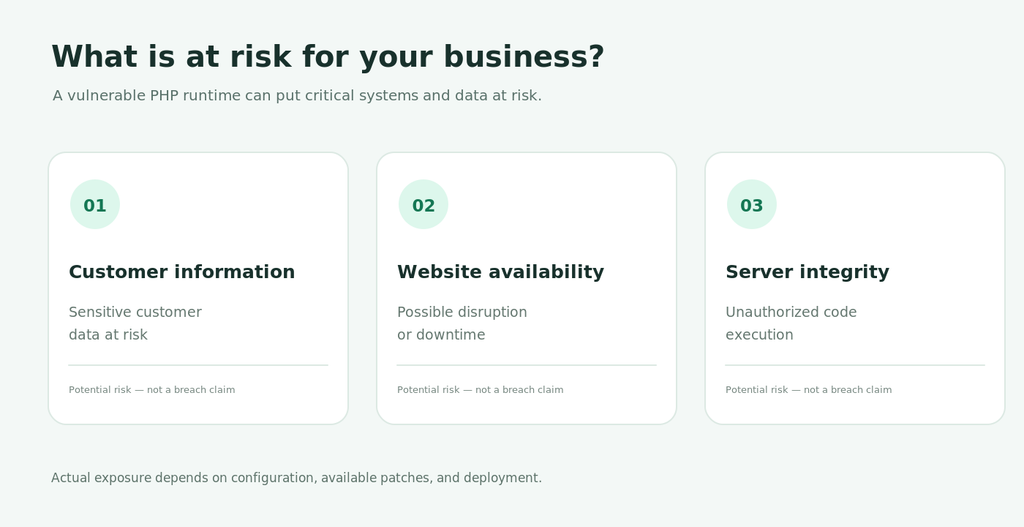
- Customer data exposure: access to information available to the compromised server process.
- Website or checkout disruption: malicious changes or service downtime that interrupt sales and inquiries.
- Credential theft: exposure of configuration files, API keys, or database credentials accessible to that process.
- Recovery costs: incident investigation, restoring systems, resetting credentials, and communicating with affected stakeholders.
However, these are possible consequences, not proof that attackers have breached every affected website. The specific exposure depends on the deployed PHP version, server configuration, security controls, and attacker access.
Therefore, for an online business, the priority is straightforward: confirm your patch status rather than assuming that an updated WordPress plugin or a managed hosting subscription automatically solves a PHP runtime issue.
PHP vulnerability 2026 (PHP2Shell) in plain English
PHP powers the server-side functionality of many websites and applications. The October 2026 flaws are in PHP itself, not specifically in WordPress, Laravel, or WooCommerce.
- CVE-2026-109618: a memory-handling issue involving request failure and cleanup paths.
- CVE-2026-109619: a memory-safety issue involving reuse of previously freed memory.
As a result, under vulnerable conditions these flaws can open a path to remote code execution. Still, you should assess the exact exploitability of a particular server rather than infer it solely from the presence of PHP.
Importantly, PHP’s official release announcements state that there are no complete mitigations; updating is the only safe choice. See the PHP October 21, 2026 release notices.
Which PHP versions need an update?
The PHP project issued the following fixed releases on October 21, 2026:
| PHP branch | Official fixed release | What to do |
|---|---|---|
| PHP 8.5 | 8.5.12 | Install this release or a newer patched build. |
| PHP 8.4 | 8.4.27 | Install this release or a newer patched build. |
| PHP 8.3 | 8.3.36 | Install this release or a newer patched build. |
| PHP 8.2 | 8.2.35 | Patch now and plan a branch upgrade. |
| PHP 8.1 and older | Outside routine upstream support | Move to a supported branch; coordinate any interim vendor backport with your hosting team. |
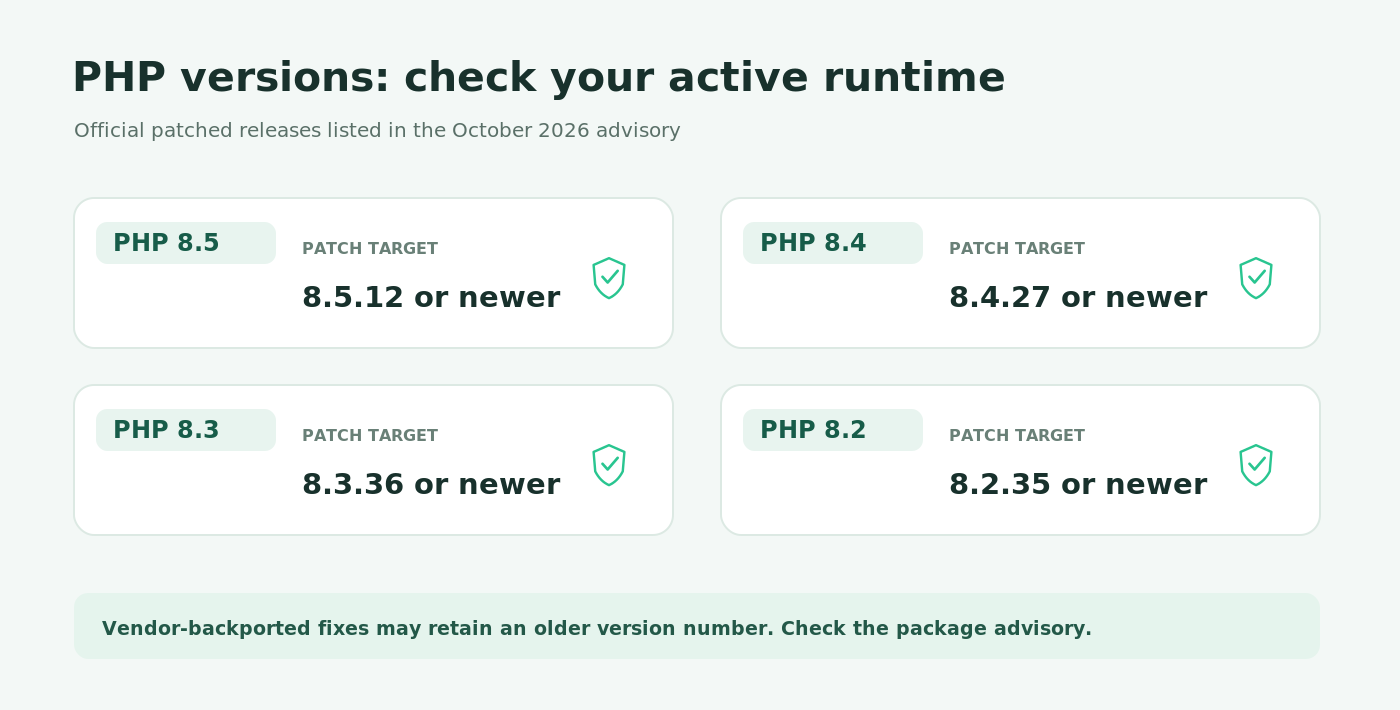
Important qualification: for example, some Linux vendors backport fixes into their own PHP packages without adopting the upstream version number. An apparently older version string does not conclusively prove a package is unpatched. Therefore, check your distribution or hosting vendor’s security advisory and package revision.
Planning note: PHP 8.2 reaches end of life on December 31, 2026. Patching to 8.2.35 addresses this emergency, but it is not a long-term modernization plan. See PHP’s supported versions.
How to check your website’s PHP version
Choose the method appropriate to your hosting environment.
Option 1: WordPress or WooCommerce
In WordPress admin, go to Tools → Site Health → Info → Server and look for the PHP version. This is more relevant to the site than the PHP command-line version on an unrelated shell.
Option 2: cPanel, Plesk, or managed hosting
Open your hosting dashboard and locate the PHP version assigned to the specific website or domain. If the provider manages security updates, ask it to confirm the patched package or vendor security advisory—not just the displayed version.
Option 3: Server access (SSH)
Run:
php -vThis displays the command-line (CLI) PHP version, which may not be the version processing website requests. For instance, on systems using PHP-FPM, identify the active PHP-FPM service or pool and inspect the installed package version. In addition, depending on how PHP is installed, an additional check may be:
php-fpm -vHowever, that command is not present under the same name on every server. Do not treat CLI output alone as proof the website is patched. Instead, your team must verify the web-facing runtime and any vendor backported security fix.
Already on a fixed version?
Good—but verify that all relevant environments are covered, including production, staging, scheduled jobs, containers, and older sites on the same hosting account. After all, a dashboard showing one site’s version does not automatically establish the patch status of every other deployment.
How to patch the PHP vulnerability 2026 safely
Even for a business-critical site, patching the PHP vulnerability 2026 still needs controlled execution.
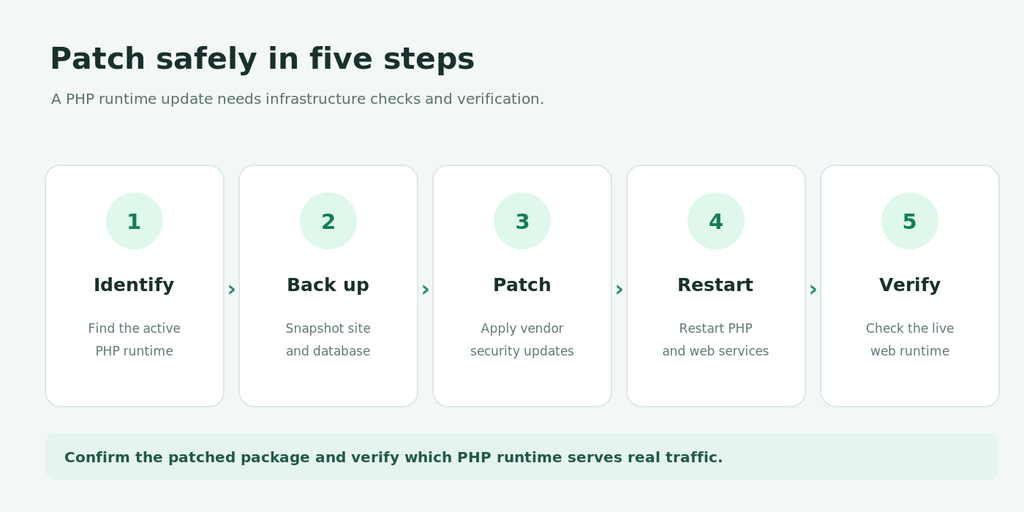
- Inventory affected sites and runtimes. Identify domains, web servers, PHP-FPM pools, containers, and managed-hosting instances.
- Take a recoverable backup or snapshot. Confirm you can restore the application and database if an update fails.
- Check application compatibility. Review your WordPress plugins, themes, Laravel dependencies, and required PHP extensions. Test in staging where practical without delaying critical risk reduction unnecessarily.
- Apply the appropriate vendor or upstream security update. Update the actual packages or container images used by your website. Package names and update commands vary by operating system and repository.
- Restart or redeploy the relevant runtime. Make sure the update replaces old PHP-FPM or web-server workers; rebuilding a Docker image is not enough unless you deploy the updated image.
- Verify the website and security state. Confirm the web-facing PHP runtime is patched, then test login, checkout, forms, integrations, background jobs, and error logs.
For WordPress users: updating WordPress core or plugins is useful routine maintenance; however, it does not replace updating the PHP runtime.
Laravel teams should check application and dependency compatibility, deploy the patched runtime, and then test queues, schedulers, integrations, and API endpoints.
For system administrators: avoid copying generic apt or dnf commands without first checking which PHP repository, package stream, version-specific packages, and services the server actually uses. Otherwise, a successful package command does not guarantee that the active web application is using the patched binary.
What if you cannot patch immediately?
If you cannot patch at once, escalate the decision to the person responsible for the server and set the earliest feasible emergency change window. Meanwhile, temporary exposure-reduction measures may be available for a specific environment, but you should present none of them as an equivalent fix.
While arranging the update, consider restricting unnecessary internet access, checking relevant logs and alerts, and confirming recoverable backups. Avoid unverified configuration changes that could break production or create a false sense of protection. Follow your hosting provider’s and the official PHP security guidance for any environment-specific interim measures.
If you suspect compromise, patching alone is not sufficient: preserve evidence and arrange incident response, credential review, and integrity checks.
The message every website owner should send their developer
You do not need server access to ask for a meaningful answer. Send this:
Please confirm whether our website is patched against CVE-2026-109618 and CVE-2026-109619 (PHP2Shell). Which PHP version and vendor package are serving our live website? When was the fix applied, and how did you verify it? Please also confirm that checkout, forms, and integrations were tested after the update.
A convincing response includes the affected systems, patch or advisory reference, update date, and verification result. “We think the server is updated” is not sufficient evidence.
How Provis Technologies can help
Responding to the PHP vulnerability 2026 is rarely a single PHP update. It is discovering every location where PHP runs, applying an appropriate patch without breaking revenue-critical workflows, and proving the change worked.
Provis Technologies can help assess and plan:
- PHP security and patch-readiness review for WordPress, WooCommerce, Laravel, and other PHP applications.
- Hosting and runtime verification across relevant production systems and application environments.
- Patch and upgrade planning with compatibility testing and rollback considerations.
- Post-update validation of key user journeys, such as checkout, logins, forms, and integrations.
- Longer-term PHP modernization for applications nearing or beyond supported-version deadlines.
Need to confirm whether your website is protected?
Request a PHP Security & Patch Readiness Review
Share your website platform and hosting setup. We can discuss the checks needed to determine your patch status and the safest next steps. This is an assessment request, not a claim that your website has already been scanned.
Frequently asked questions
Is my WordPress website automatically vulnerable?
Not automatically. WordPress runs on PHP, so the relevant question is whether the underlying PHP runtime uses an affected, unpatched build and whether the deployment is exploitable. Check the actual web-facing version and hosting vendor’s security status.
Can hackers exploit these vulnerabilities without a password?
The PHP project describes the two flaws as potentially enabling unauthenticated remote code execution. That is why they merit urgent attention. It does not mean every PHP website has been compromised.
Does updating WordPress or Laravel fix the PHP vulnerability 2026?
No. Application updates and PHP runtime updates address different layers. Instead, the underlying PHP build itself must carry the security fix.
I use managed hosting. Do I still need to do anything?
Yes. Specifically, confirm with the provider that your specific site’s web-facing PHP runtime has received the relevant security patch or an equivalent vendor backport.
Is PHP 8.2.35 safe to keep using indefinitely?
No. It is the October 2026 fixed release for the PHP 8.2 branch, but upstream support ends on December 31, 2026. Therefore, plan a compatible move to a supported branch.
How do I know the update worked?
Confirm the patched web-serving runtime or vendor package, restart or redeploy relevant services, and test business-critical workflows. Do not rely solely on php -v from an SSH session.
Sources and official references
- PHP News Archive — October 21, 2026 security releases
- PHP 8.2.35 release announcement
- PHP 8.4.27 release announcement
- PHP 8.5.12 release announcement
- PHP supported versions and end-of-life dates
- CISA Known Exploited Vulnerabilities Catalog
Information reflects public advisories available on October 27, 2026. Patch availability and applicability depend on the server’s installation and vendor package.

Anish Ojha
For the past 8 years, he has been engaging with clients and potential clients to enable business transformation. He is committed to building a reputation for quality and delivery for our clients while building a strong technical and social culture within the company.