

PHP 8.2 End of Life: How to Secure Your Website Now
PHP 8.2 end of life is 31 December 2026, and about 55% of WordPress sites run 8.2 or older. Check your version and update safely to PHP 8.4.

On this page 13
- What does PHP 8.2 end of life mean for my website?
- How many websites does PHP 8.2 end of life affect?
- How do I check which PHP version my website uses?
- Which PHP version should I move to?
- How to update a WordPress or WooCommerce site safely
- Laravel apps face a second deadline
- What will my hosting company do at PHP 8.2 end of life?
- Your three choices after PHP 8.2 end of life
- What does a PHP update cost?
- Questions to ask your developer or agency
- Online stores: timing your update before PHP 8.2 end of life
- How Provis Technologies can help
- Common questions
- When does PHP 8.2 reach end of life?
- Will my website stop working after PHP 8.2 end of life?
- Is it safe to keep my WordPress site on PHP 8.2 after end of life?
- Which PHP version should I use for WordPress in 2027?
- Will my hosting company update PHP for me?
- How long does a PHP update take?
- Can I pay for extended support after PHP 8.2 end of life?
- Do I need to update Laravel when I update PHP?
Summary: PHP 8.2 end of life is 31 December 2026. PHP is the software that runs most websites behind the scenes. After that date, the PHP project will release no more security fixes for version 8.2. Sites on 8.2 will keep working, but any security hole found from 2027 onwards will stay open. Most sites should move to PHP 8.4, after testing the change on a copy of the site.
Check which PHP version your site uses. It takes about two minutes.
If the version is 8.2 or lower, plan the update for December.
Test the new version on a copy of the site before changing the live site.
PHP 8.2 end of life affects WordPress, WooCommerce and Laravel sites, which all run on PHP and often still use version 8.2 or older. According to WordPress.org, 22.7% of WordPress sites use PHP 8.2 and a further 32.6% use 8.1 or older. From 1 January 2027, about 55% of WordPress sites will therefore run a PHP version that no longer receives security fixes.
We wrote this guide for business owners and the people who manage their websites. If you are dealing with the PHP2Shell security flaw from October 2026, start with our PHP2Shell guide, which covers the immediate fix, then return here to plan the move away from PHP 8.2.
What does PHP 8.2 end of life mean for my website?
Your website will still load and look the same on 1 January 2027. End of life means the PHP project stops maintaining version 8.2. It is similar to a phone that no longer receives security updates: the phone still works, but nobody fixes newly discovered security holes.
PHP runs underneath every page of your site, so a flaw in PHP can expose the whole site. In October 2026, a serious flaw called PHP2Shell allowed attackers to take control of servers without a password. PHP 8.2 received a fix in version 8.2.35. A similar flaw discovered in 2027 would receive no fix for PHP 8.2.
Three other changes follow:
- Hosting companies will remove PHP 8.2. WP Cloud, which runs WordPress.com hosting, removes it on 15 December 2026. If a host moves your site to a newer version without testing it first, older add-ons can stop working.
- WordPress already flags it. On a site running PHP 8.2, the Site Health page in the WordPress dashboard reports that PHP is out of date.
- Compliance becomes harder to demonstrate. If your shop takes card payments, the card industry’s security standard (PCI DSS) requires you to keep systems up to date with security fixes. In the UK, data protection law requires you to keep customer data secure. After a security incident, it is hard to justify running software that nobody patches any more.
How many websites does PHP 8.2 end of life affect?
More than half of all WordPress websites. The figures below are WordPress.org’s published statistics for 6 November 2026.
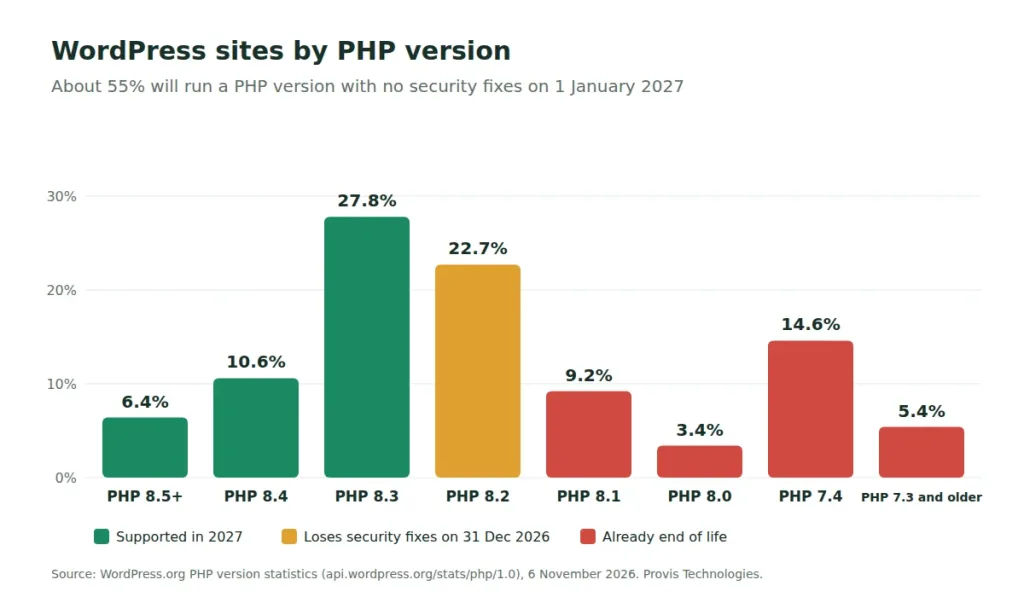
About one in seven WordPress sites still runs PHP 7.4, which stopped receiving fixes almost four years ago. Old PHP versions often stay in place until something breaks, which makes them a common target for attackers.
How do I check which PHP version my website uses?
Most owners can check this without a developer.
- In WordPress or WooCommerce, open the dashboard and go to Tools, Site Health, then the Info tab. The Server section lists the PHP version.
- In your hosting account, the website’s settings page usually shows the PHP version. In cPanel, look for “Select PHP Version” or “MultiPHP Manager”.
- For a Laravel app or other custom software, ask your developer, who can check it in a few seconds.
Note the full version number, for example 8.2.35. If it begins with 8.2 or lower, your site is affected. If it is an 8.2 version below 8.2.35, ask your developer or host to apply the PHP2Shell fix now, as described in our PHP2Shell guide.
Which PHP version should I move to?
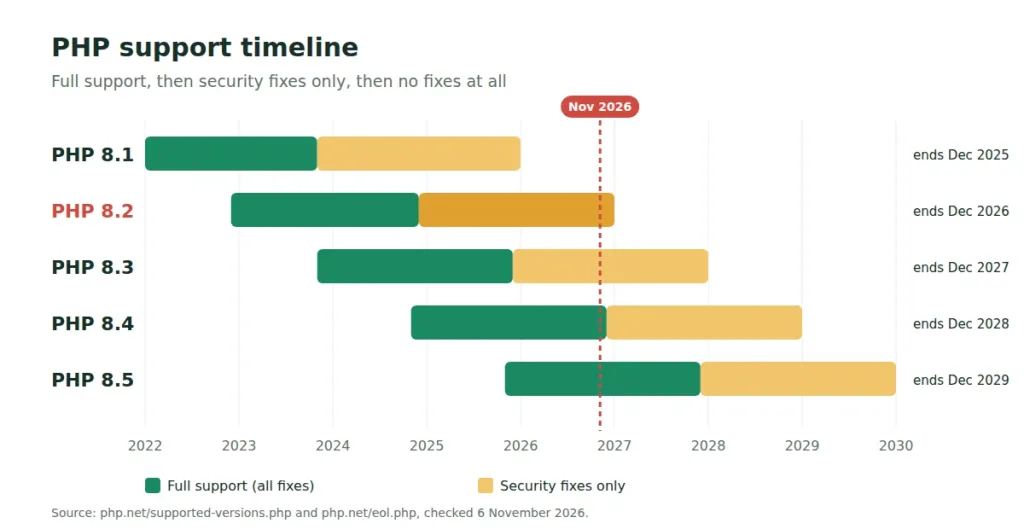
PHP 8.4 is the right target for most websites. It receives security fixes until the end of 2028, and current versions of WordPress, WooCommerce and Laravel all support it.
| PHP version | Security fixes until | Suitable for |
|---|---|---|
| 8.2 | 31 Dec 2026 | No new use; WordPress already flags it as out of date |
| 8.3 | 31 Dec 2027 | Sites with an add-on that does not yet support 8.4 |
| 8.4 | 31 Dec 2028 | Most websites |
| 8.5 | 31 Dec 2029 | New websites, or sites whose add-ons are all up to date |
Moving to 8.4 takes about the same work as moving to 8.3, and it gives an extra year of security fixes before the next update.
How to update a WordPress or WooCommerce site safely
Most failed updates happen when someone changes the PHP version directly on the live website. The safer order is as follows.
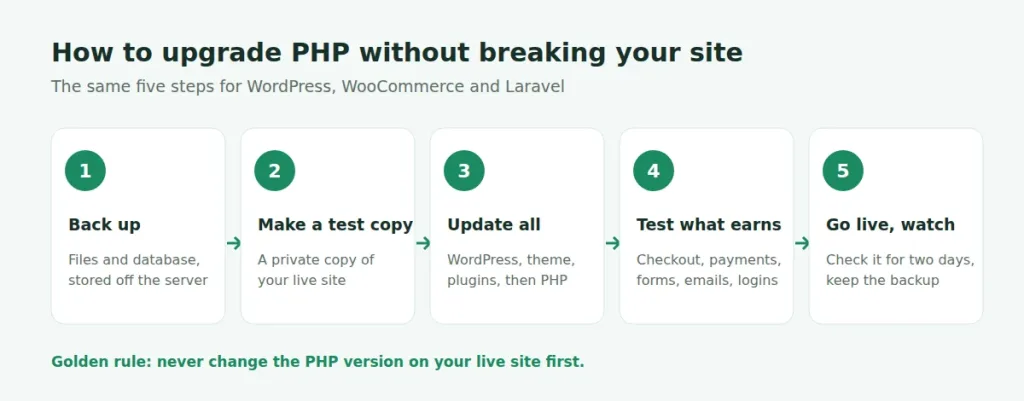
- Back up the whole site and store a copy outside your hosting account.
- Create a test copy of the site, often called a staging site. Many hosts offer this as a one-click option.
- On the test copy, update WordPress, your theme (the site’s design) and all plugins (the add-ons). Remove plugins you no longer use. Plugins that nobody has updated in years cause the most problems. Then switch the test copy to PHP 8.4.
- Test everything that generates revenue: adding to cart, each payment method, order emails, contact forms, logins and bookings.
- Switch the live site at a quiet time of day. Monitor it for two days and keep the backup available in case you need to restore it.
What does “Your site is running an outdated version of PHP” mean?
WordPress shows this message when the site’s PHP version is older than the version WordPress recommends, currently 8.3. It is a warning only, and the site continues to work normally. The message disappears once the site runs PHP 8.3 or newer.
Additional checks for online shops
WooCommerce’s server requirements now list PHP 8.3 or newer, so a shop on 8.2 is already below the recommended setup. Payment, shipping-rate and invoice add-ons are the most likely to fail on a newer PHP version, so test those first. If you would prefer to hand the work over, our WooCommerce team and WordPress support team can carry it out.
Laravel apps face a second deadline
Laravel is a framework that developers use to build custom web applications, such as customer portals, booking systems and online software. A business running a Laravel app has two support dates to track: one for PHP and one for Laravel itself.
- Laravel 11: security fixes ended on 12 March 2026
- Laravel 12: security fixes until 24 February 2027
- Laravel 13: security fixes until 17 March 2028
An app on Laravel 11 or 12 and PHP 8.2 will lose both forms of support within a few weeks of each other. Moving to PHP 8.4 and Laravel 13 in a single project avoids paying for two separate upgrades.
Before the work starts, ask your developer to:
- confirm that every add-on the app uses has a version that supports Laravel 13 and PHP 8.4, and replace any that are no longer maintained
- run the app’s automated tests, or write tests for the most important tasks such as sign-ups, payments and reports
- test background jobs, such as outgoing emails and overnight tasks, which often fail without any visible error
- update PHP on every server the app uses, not only the main web server
We carry out this work on applications built by other teams. For LFT (Law Firm Tools), a legal application on an older PHP setup, we maintain the app and are restructuring its code so it can move to a newer PHP version safely. Our Laravel upgrades page describes our approach.
What will my hosting company do at PHP 8.2 end of life?
Hosting companies handle outdated PHP versions differently, and several have not yet announced their plans. Published plans at 6 November 2026:
- WP Cloud (WordPress.com hosting): removes PHP 8.2 on 15 December 2026
- Acquia: support ended on 1 October 2026; PHP 8.4 recommended
- Kinsta: removes versions after end of life; the date appears in the Kinsta dashboard
- SiteGround: moves sites to newer versions automatically when “Managed PHP” is enabled
- Hostinger and most cPanel hosts: the existing version usually keeps running until you change it
- WP Engine, GoDaddy, Cloudways: no announcement found; contact their support teams
When a host updates PHP automatically, the change happens on the host’s schedule and on the live site, without testing. Ask your host:
- When will PHP 8.2 be removed or changed on my plan?
- Which version will my site be moved to?
- Can I test the new version on a copy of my site first?
Your three choices after PHP 8.2 end of life
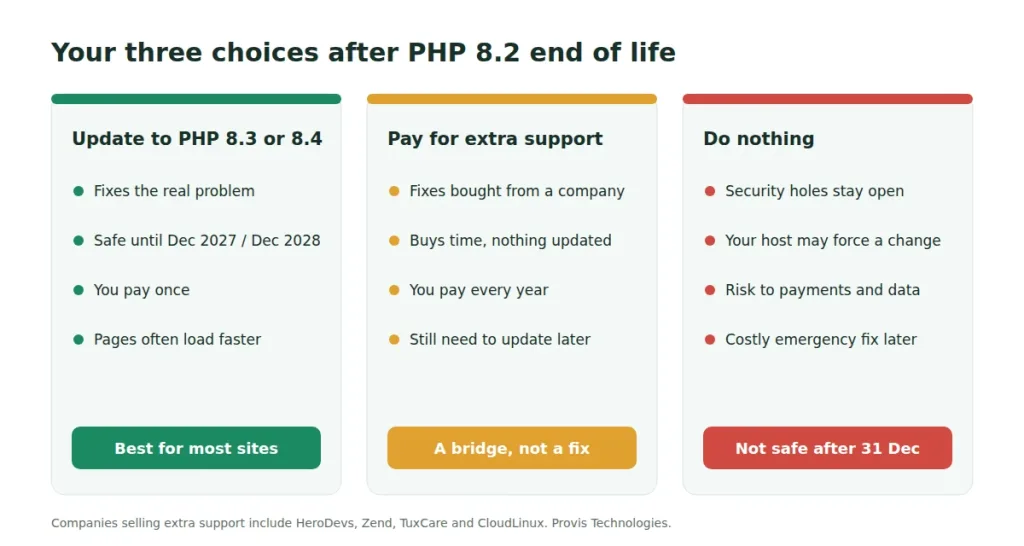
Updating to PHP 8.4, or 8.3, resolves the issue. It is a one-off cost, and the site remains covered until the end of 2028. This is the right choice for almost every business website.
Companies such as HeroDevs, Zend, TuxCare and CloudLinux sell extended support, which provides security fixes for old PHP versions. It buys time, but you pay the fee every year and still need to update later. It suits large, complex systems that cannot be updated before the deadline.
Doing nothing leaves the site working but exposed to every new PHP flaw, and a host may force a change at an inconvenient time. Recovering from a hacked site usually costs far more than a planned update.
Not sure what your site needs? Send us your website address. Within two working days, we will explain how we would update it, with a rough timeline and a cost range. The assessment is free and carries no obligation.
What does a PHP update cost?
Cost depends more on how outdated a site is than on its size. Four factors make the biggest difference:
- The condition of the code. A well-built site is quicker to update.
- How far behind the site is. Moving from PHP 8.2 is simpler than moving from 7.4.
- How much needs testing. A brochure site has a few pages to check, while a shop or app has payments, accounts and emails.
- Connections to other services, such as payment providers, booking systems and CRMs, each of which needs checking.
We review the site before quoting, so the price reflects the work your site actually needs. After the update, a website maintenance plan keeps PHP and add-ons current, so the next PHP deadline does not require a separate project.
Questions to ask your developer or agency
Before work begins, ask whoever is doing it:
- Which PHP version are you moving us to, and why?
- Will you test on a copy of the site before changing the live site?
- Where is the backup kept, and how quickly can you restore it?
- Which add-ons are outdated or abandoned, and what will replace them?
- Will you test a real payment with each payment method?
- Who will monitor the site after the switch, and for how long?
- Will we keep full control of our hosting account?
- What written report will we receive when the work is complete?
Most of a careful update is testing, so vague answers about testing are a reason for concern.
Online stores: timing your update before PHP 8.2 end of life
Most shops avoid changes during the Black Friday period. That leaves a short window after Cyber Monday (30 November) and before mid-December. If that is too tight, schedule the update for early January. Until then, make sure the site runs PHP 8.2.35 or newer, and ask your host what will happen to your site between 31 December and the update date.
How Provis Technologies can help
Since 2012 we have built and maintained PHP, WordPress, WooCommerce and Laravel websites and applications for businesses in the US, UK, the Gulf and India. For PHP 8.2 end of life, we can update your PHP version on WordPress, WooCommerce, Laravel or custom-built sites, always testing on a copy first. We also take over sites built by other teams, as we did with LFT, and provide monthly maintenance that keeps PHP and add-ons up to date.
Request a free PHP update check. Send us your website address and the name of your hosting company. Within two working days, you will receive our recommended approach, a timeline and an estimated cost. To discuss it directly, book a call or message us on WhatsApp from our contact page.
Common questions
When does PHP 8.2 reach end of life?
PHP 8.2 reaches end of life on 31 December 2026. After that date, the PHP project will not release security fixes for version 8.2, including for serious flaws.
Will my website stop working after PHP 8.2 end of life?
No. Your website will keep working on 1 January 2027. However, nobody will fix new security flaws, and your hosting company may move the site to a newer version. If nobody has tested the site on that version, some features may stop working.
Is it safe to keep my WordPress site on PHP 8.2 after end of life?
It is not recommended. WordPress already reports PHP 8.2 as out of date and recommends 8.3 or newer. From 2027, any new security flaw in PHP 8.2 will remain open unless you pay a vendor for extended support.
Which PHP version should I use for WordPress in 2027?
PHP 8.4 is the best choice for most WordPress and WooCommerce sites. Current WordPress and WooCommerce versions support it, and it receives security fixes until 31 December 2028. Use PHP 8.3 only if an important plugin does not yet support 8.4.
Will my hosting company update PHP for me?
It depends on the host. WP Cloud removes PHP 8.2 on 15 December 2026, and some hosts move sites automatically, while others leave the old version running. Ask your host when the change will happen and whether you can test it first.
How long does a PHP update take?
A simple WordPress site with up-to-date plugins can often be updated in a day. A shop with many plugins usually needs a few days of testing. Sites with custom-built features or older Laravel apps can take one to several weeks.
Can I pay for extended support after PHP 8.2 end of life?
Yes. Companies such as HeroDevs, Zend, TuxCare and CloudLinux sell security fixes for old PHP versions. This buys time, but you pay the fee every year and still need to update later. Most small and medium-sized businesses are better served by updating.
Do I need to update Laravel when I update PHP?
Usually, yes. Laravel 11 stopped receiving security fixes in March 2026, and Laravel 12 stops on 24 February 2027. Laravel 13 receives security fixes until March 2028, so most apps should move to PHP 8.4 and Laravel 13 together.
Facts checked on 6 November 2026. We will update this guide after PHP 8.2 reaches end of life on 31 December, and again after Laravel 12 security support ends on 24 February 2027. Related reading: how to perform a website health check.

Anish Ojha
For the past 8 years, he has been engaging with clients and potential clients to enable business transformation. He is committed to building a reputation for quality and delivery for our clients while building a strong technical and social culture within the company.