





Let Users Type, Talk or Send a Photo
We build multimodal AI into apps, so a typed message, a voice note or a photo each gets a reply, in the user's own language.
 WhatsApp


Why your app still makes people type everything
Your users already speak in voice notes and send photos. If the app understands only typed text, they retype what they could have said or shown, or they give up.
-
“Our users would rather send a voice note than type.”

The app takes the voice note, understands it and replies, in the user's own language.
-
“A photo says more than any form our users fill in.”

An AI model that reads images (a vision model) looks at the photo, and the app replies with what it found, for a person to check.
-
“Every kind of input needs its own tool.”

We pick a model for each kind of input and join them behind one feature, so your app handles them all.

Voice notes, photos and screenshots your app understands
Each job here is easier to say or show than to type. Where we have built one in a live app, the item links to it.
-
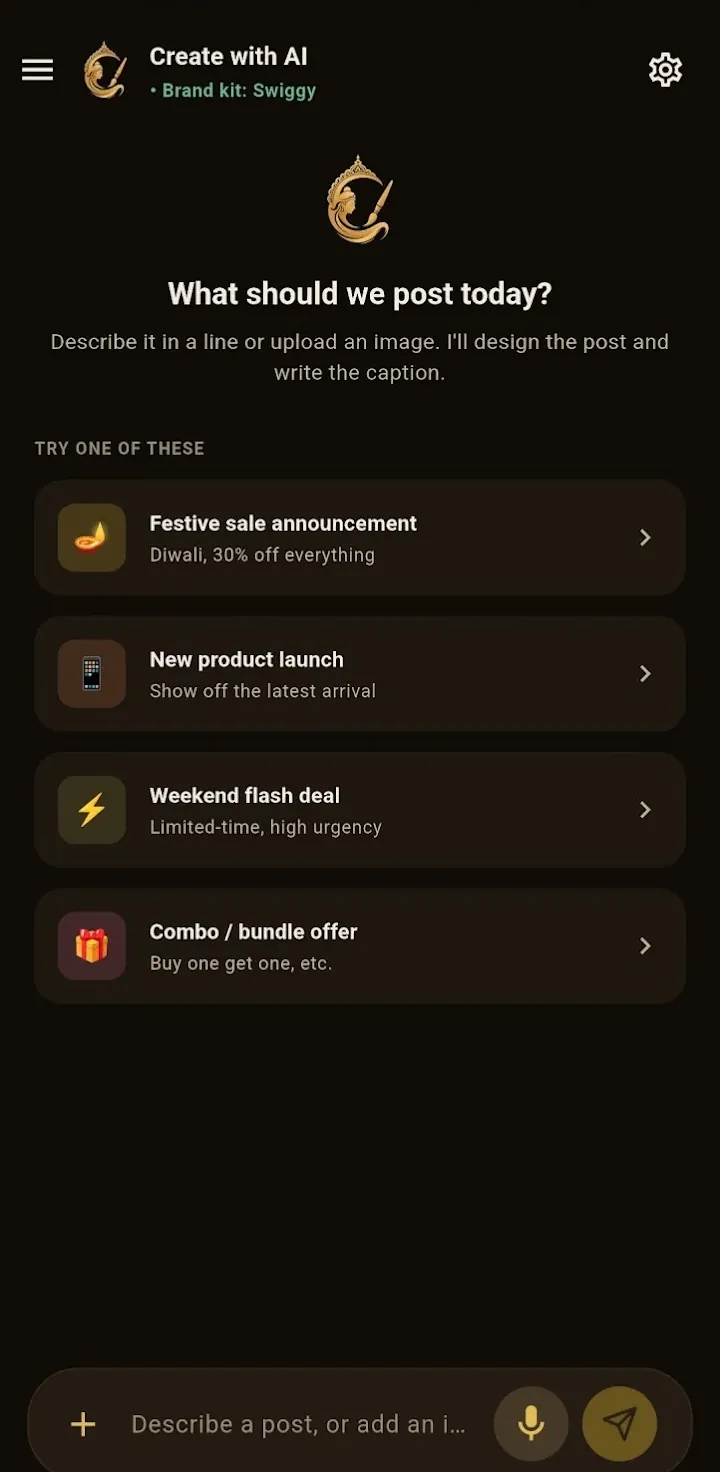
A voice note or a photo, turned into a post
A shop owner types or speaks one line, can attach a photo, and gets the artwork, caption and hashtags in their own brand.
Chitra -
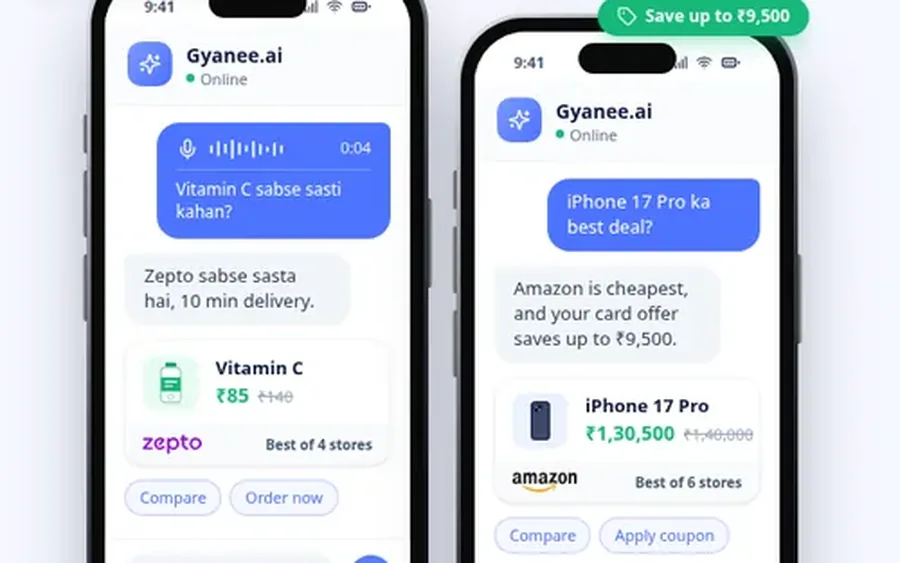
Voice questions in Indian languages
Shoppers ask by voice, in Hinglish (Hindi and English mixed) or another Indian language, and get the answer in the chat.
Gyanee.ai -
Orders from a photo of a list
A shop sends a photo of a handwritten order; the AI reads the items and drafts the order for a person to check.
-
Voice notes from the field
Sales or service staff speak a visit note, and the app turns it into a written summary in your system.
-
Screenshots and scanned pages
Users send a screenshot or a scanned page, and the app answers their question about it in text.
Only adding text answers from a large language model (LLM) to your product? See LLM integration
A model for each input, with checks and costs you can see
You get the feature in your app for each kind of input you choose, with the checks around it and tests on real inputs. A record shows what each reply costs.
-

Inputs in your app
Type, hold to speak or attach a photo, in your web or mobile app.
-

A model for each input
Speech, vision and text models chosen for the job, behind one layer you can change.
-

Content checks
A check of what each message asks for, and checks that block unsafe or off-topic requests (guardrails).
-

Language handling
The app's language wins, so a reply never comes back in the wrong one.
-

Test inputs
Real photos, voice notes and messages with the replies you expect.
-

Costs you can see
Every reply and image is recorded with its provider, model and estimated cost, so you know what each one costs.
In production
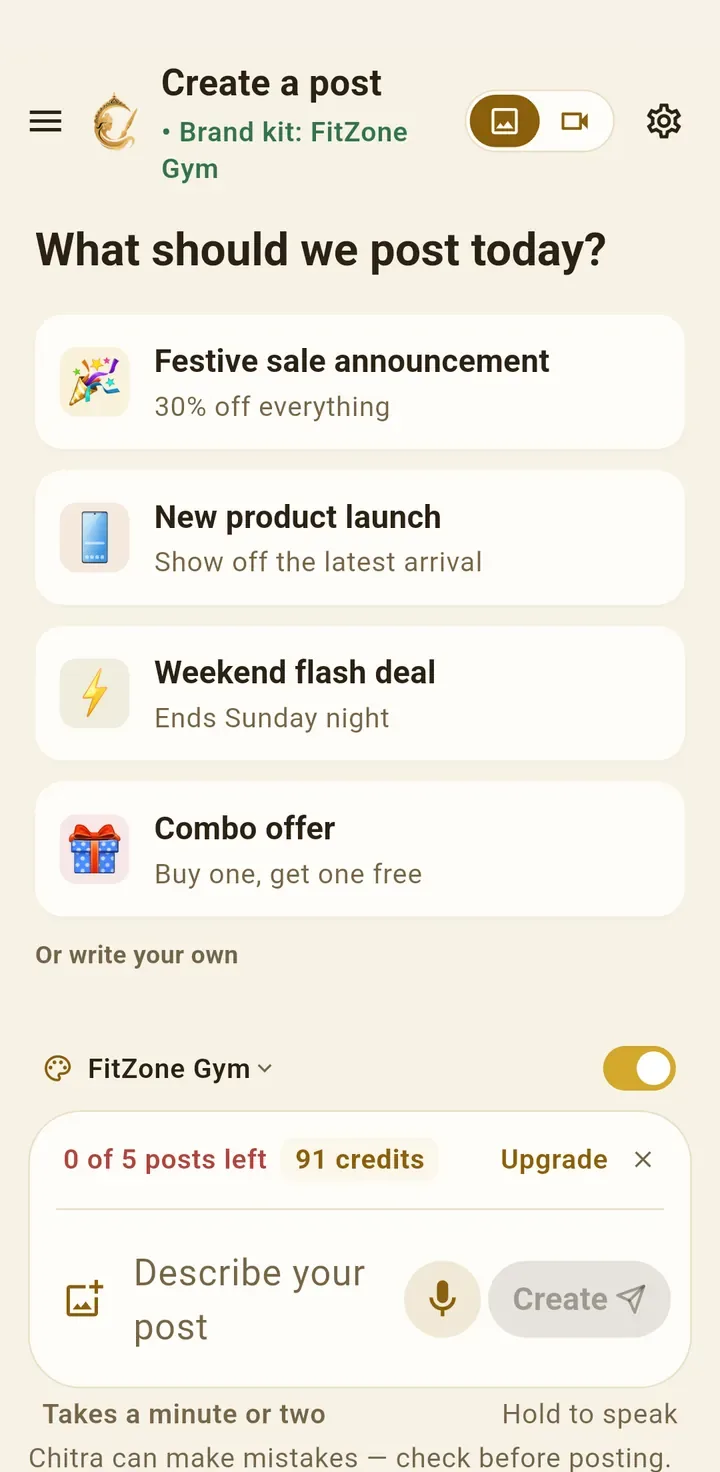
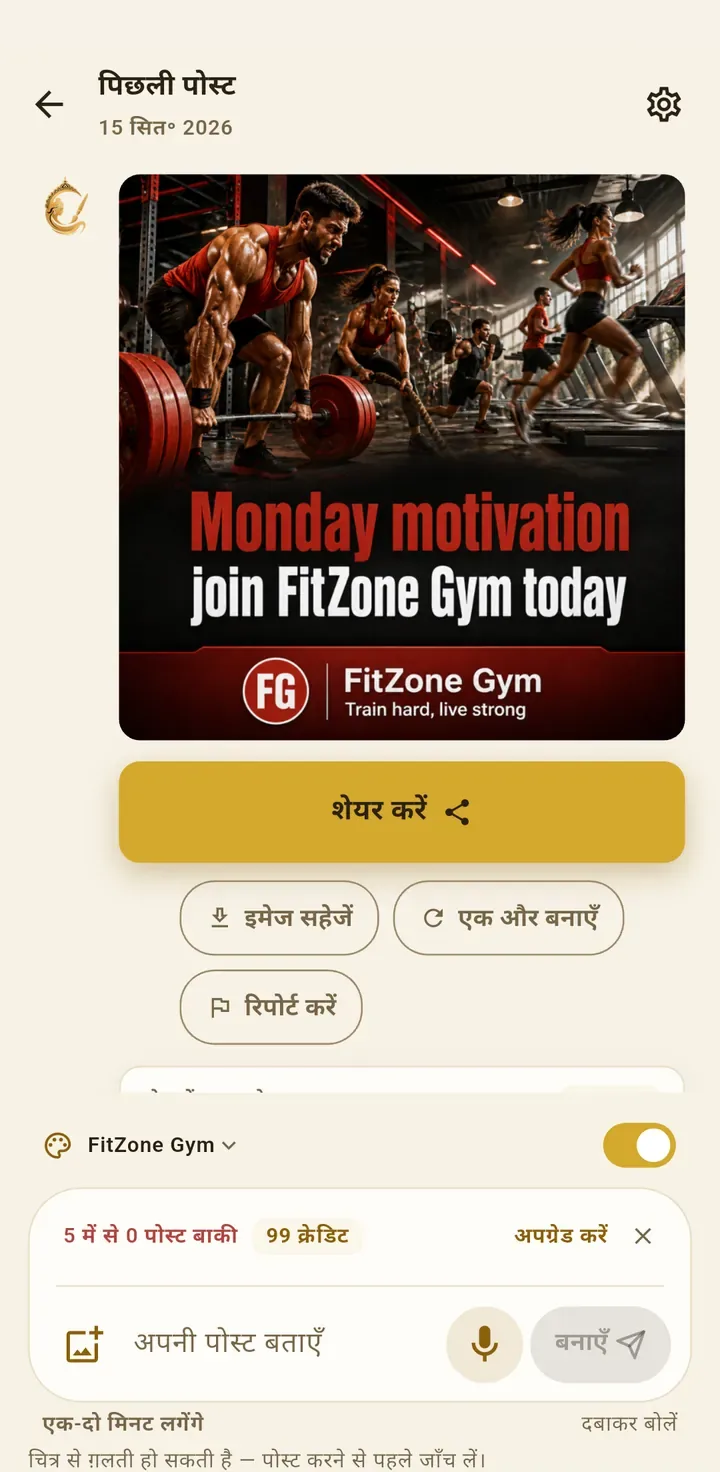
Chitra: type, speak or attach a photo, and get a post back
Chitra is Provis's own app, live on Google Play and the App Store. A small business owner types one sentence or speaks a voice note, can attach a photo, and gets a finished post with their logo, colours, caption and hashtags, in 9 Indian languages.
- Built
- A chat-style post maker (type or speak one line, attach a photo), a brand kit applied to every post, and 4 to 8 second AI video.
- Responsible AI
- Each image carries the words “Created with Chitra AI”, and a hidden tag in the file records that it was made with AI.

How multimodal AI works
Multimodal AI takes more than one kind of input, such as text, voice and images, and can reply in more than one kind of output. A voice note is turned into text, a photo is read by a vision model, and a language model, the kind of AI behind ChatGPT and Claude, puts it together into one reply in the user's language.
-
Input
A person types, speaks or sends a photo.
-
Read
Each input is turned into something the model can use.
-
Model
The model writes the reply, or makes the image.
-
Checks
Language and content checks run before anything is shown.
-
Reply
The reply comes back in text or as an image, in the user's language.
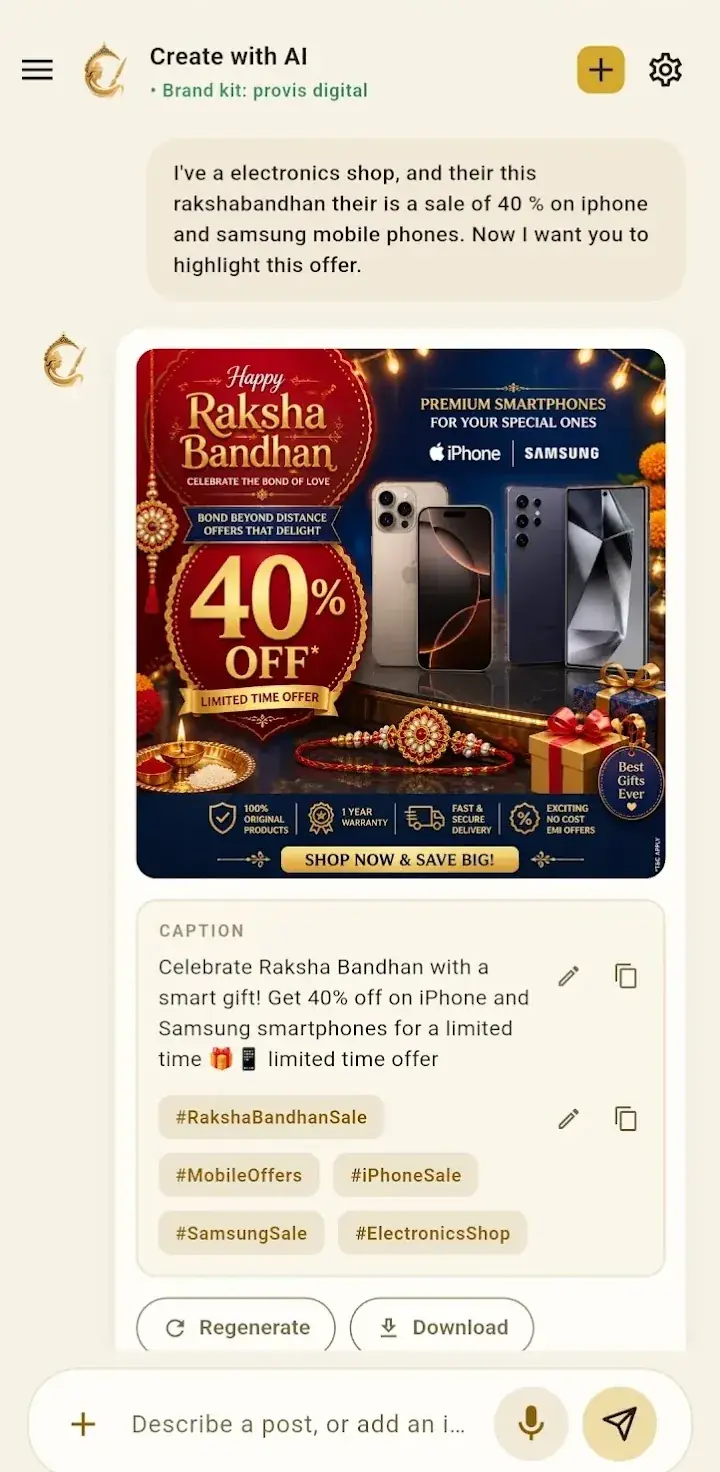
- Input A voice note: “a post for our Diwali sale on shirts”
-
Read
Turns the voice note into text, so the request can be read. -
Read
Looks up the business's brand kit for its logo, colours and tone of voice. - Model The language model writes the caption, and the image model makes the artwork with the logo in it.
- Checks The reply is in the app's language, and the content checks pass.
- Reply The finished post, caption and hashtags appear in the chat.
Had the image provider failed, the post would have stopped there and the user's credit returned.
We made Chitra for users who would rather speak or show
We built Chitra for real users who would rather speak or show than type, in their own language. We build your feature the same way, with us still there after launch.
 View our work
-
We ship live AI products
Gyanee.ai, which we built, and our own Chitra and ProvisCommerce are live on the App Store, Google Play and the web.
-
Built around your app
We add voice, photo and text inputs to the app and tools you already run, instead of replacing them.
-
Support after launch
We monitor the feature after launch, check its replies stay in the user's language, and improve it as new models arrive.
-
Hours that overlap yours
We work on India Standard Time (IST): 4.5 to 5.5 hours ahead of London and 9.5 to 10.5 ahead of New York.
Photos and voice notes kept only as long as you decide
Photos and voice notes carry more than people mean to share. We decide with you what the app may keep, check every input and reply, and label what the AI made.
On every multimodal feature we build
- A check of what each message asks for, and checks that block unsafe or off-topic requests (guardrails).
- Images the AI makes are labelled as AI-made, in the picture and in the file.
- Photos and voice notes are kept only as long as you decide.
- Every reply and image is recorded with its model and cost, with alerts on spend.
Proved on your users' own voice notes and photos
We start with the one input your users most want to use and prove it on real examples. Then we add the others.

The models and tools we build multimodal AI with
Standard, widely used tools, so another team could take the code over. We pick a model for each kind of input and can change it later, so you stay free to switch provider. We build on your app and in your own cloud account.
-
Models
OpenAI, Anthropic Claude and Google Gemini, chosen for each kind of input.
-
 OpenAI
-
 Anthropic Claude
- Google Gemini
-
-
Voice and video
Sarvam AI for voice in Indian languages, and Google Veo for short AI video.
- Sarvam AI
- Google Veo
-
Model access
OpenRouter, a single connection to many AI models, so a model can change without a rebuild.
- OpenRouter
-
Backend and apps
Python and FastAPI with LangChain and LangGraph, and Flutter apps for Android and iPhone.
- Python
- FastAPI
- LangChain
- Flutter
-
Your app
Your web or mobile app, and the systems its replies go into.
Provis Technologies AI Integration services are phenomenal. We have been witnessing growth after the AI automation they have put into our business.

Tell us what your users would rather say or show.
Send us an example of the voice notes, photos or screenshots they would send. We will show you the models we would use for each input, and what the app should never keep.




Vivek SharmaCEO & Founder, Provis Technologies
Questions about multimodal AI development
What is multimodal AI?

AI that takes more than one kind of input, such as text, voice and images, and can reply in more than one kind of output. In an app, that means a user can type, speak or send a photo, and the app turns each one into a reply in text or as an image.
How is this different from LLM integration?
LLM integration adds a large language model (LLM), the AI behind ChatGPT and Claude, to your product for text, such as answers, summaries and replies. Multimodal AI adds the inputs people send that are not typed, such as voice notes, photos and screenshots, and outputs such as images. Many products start with text and add these later.
Can it understand voice notes in Indian languages?
Yes. Chitra turns a voice note into a finished post and works in 9 Indian languages. Gyanee.ai answers questions asked by voice, and its in-app voice conversations work in Indian languages, with Sarvam AI for voice. We test with real voice notes from your users before launch.
Can it read photos?
Yes. Models such as Gemini take images as well as text, so the app can describe a photo, read the text in it or answer a question about it. We test on real photos from your users, because lighting, handwriting and angles decide what works.
Can customers order from a photo of a handwritten list?
We can build it. The AI reads the items in the photo and drafts the order, and a person checks it before it is placed. We start with a pilot on your own photos.
Which models do you use?
OpenAI, Anthropic Claude and Google Gemini for text and images, Sarvam AI for voice in Indian languages, and Google Veo for short video in Chitra. We connect to them through OpenRouter, a single connection to many models, or directly with each provider, so a model can be changed later.
How do you make sure replies come back in the right language?
The app sends its own language with every request, and that language wins. In Chitra, this fixed posts that came out in English when a Hindi user typed in Latin letters. Hindi spelling is kept to one form, and taller line height stops Indic scripts overlapping.
Is our users' data kept private?
Where photos and voice notes go is your choice. With hosted models from OpenAI or Anthropic, they are processed by that provider. With open models on your own servers or cloud through Ollama, they stay inside your network. We agree with you what the app keeps, and for how long.
How do you label what the AI makes?
In Chitra, each image carries the words “Created with Chitra AI”, and a hidden tag in the file (XMP and EXIF metadata) records that it was made with AI. There is also an AI disclosure page, published in all 9 languages. We build the same kind of labelling into your app.
How much does multimodal AI development cost?
Three things drive the cost: how many kinds of input the app takes, what it replies with, and how much testing on real inputs it needs. Tell us what your users would send, and within two working days we come back with an approach, a rough timeline and a rough number.
How long does it take?
It depends on the inputs and the app they go into. We start with the one input your users most want, so they use it before we add the others. We agree the timeline at the discovery call.
Who owns the code?
You do. The code goes straight into your own code repository, and the cloud account and domain are in your company's name. Our team joins as collaborators, and you can remove our access at any time.
Do you work with UK and US clients from India?
Yes. We sign an NDA before we start, on request, and work only in the accounts you invite us into. The code repository, cloud account and domain stay in your company's name.

Work with experts
Built for teams whose users would rather speak or show
We build apps that take text, voice notes and photos, and reply in the user's own language.
Prefer to talk directly?
-
 Emailsales@provistechnologies.com
-
 WhatsApp+91 88755 82124
-
 UK phone+44 7862 126522
-
 Video callBook 30 minutes with Vivek Sharma
We're on IST: 4.5 to 5.5 hours ahead of London, 9.5 to 10.5 ahead of New York.
-
1
 The inputs
-
2
Your details
-
3
Additional info
Tell us what your users would send
Describe the inputs, such as voice notes, photos or screenshots, what the app should reply with, and what it must not keep.
Prefer to talk directly?
-
Emailsales@provistechnologies.com
-
WhatsApp+91 88755 82124
-
UK phone+44 7862 126522
-
Video callBook 30 minutes with Vivek Sharma
We're on IST: 4.5 to 5.5 hours ahead of London, 9.5 to 10.5 ahead of New York.